
Hardware and the kitchen
The kitchen
Menu: Kitchen · Catalog → Departments · Setup → Printers Who: the kitchen, the owner, the branch manager · Restaurants only.
A kitchen is told when the order is placed, whichever button placed it. A dine-in hold, a takeaway paid on the spot, a delivery — the cooks do not care which; they care that the food was ordered.
It is told in two ways, and they are separate switches. Turn on either, or both, or neither, under Settings → Kitchen for that branch:
| Switch | What it does |
|---|---|
Print a kitchen ticket for every order (kitchen.enabled) | A slip comes off the kitchen roll. Needs a kitchen printer — set up on the Sellify app's own Printers screen, or on the branch for the web POS |
This kitchen reads a screen (KDS) (kitchen.screen) | Every order reaches the Kitchen board. Needs no printer and no paper |
The screen does not depend on the printer. A kitchen that works off a display turns the paper off and keeps its board. A kitchen that wants both turns both on. A branch with neither tells its kitchen nothing, and the board says so on the page rather than looking like a quiet night.
One order, end to end
This is the whole journey, in the order it happens.
1. Somebody punches the order. A waiter on their phone or on the panel's Waiter screen, a cashier on the till, or a call-centre agent at a desk. All three produce the same order.
2. The branch accepts it, if it was not rung at the counter. An order that arrives from
a waiter or the call centre lands on every till in the branch with a banner and an alarm,
and the kitchen is told when somebody presses Accept — not before. Printing a slip into
an empty kitchen at 2am tells nobody anything. A sale rung at the counter needs no accept:
the cashier is standing in the shop, so it goes to the kitchen at once.
(call_centre.auto_accept, per branch, collapses the two for a shop that wants the paper
immediately.)
3. The card reaches the kitchen. On the roll, on the board, or both. The time it was sent is stamped on the card — that is what the colours on the board are counted from, and a card that came off a dark till carries the moment the cook was actually asked for it rather than the moment it uploaded.
4. The cook works the queue, oldest first. Amber after
kitchen.warn_minutes, red after kitchen.late_minutes.
5. A dish is ticked ready. On a dine-in card every dish carries its own tick. Sellify records who ticked it and at what time, and the dish moves to the pass.
6. Whoever punched it is told. A green Ready to collect strip appears — on the
waiter's screen, on the till that rang it, and on the Sellify app as a notification with a
sound. A plate that is ready and still standing turns amber after
kitchen.pass_warn_minutes, so the kitchen can SEE food going cold.
7. Somebody carries it out, and the tap is the pickup. Tapping the plate to clear it from your screen is what tells the kitchen it was collected. Sellify records who collected it and at what time.
8. The bill is settled at the counter — by recalling the table, exactly as before. The pass has nothing to do with the money.
What is recorded, and where
Every step above leaves a time on the card. Nothing is typed by hand.
| Recorded | What it is |
|---|---|
| Sent to the kitchen | When the cooks were asked for this card |
| Ready — time and person | When a dish was ticked, and which kitchen login ticked it |
| Collected — time and person | When somebody tapped the plate off their screen, and who |
| The card itself | The dish, its variant, its options, its deal components and its note, exactly as they went on the paper |
Between them they answer the two questions a kitchen argues about: how long the kitchen took, and how long the plate stood at the pass before anybody came for it.
Today these times are kept on the card and read on the board. There is no kitchen timings report yet — the figures are recorded and waiting for a screen to read them.
The kitchen screen
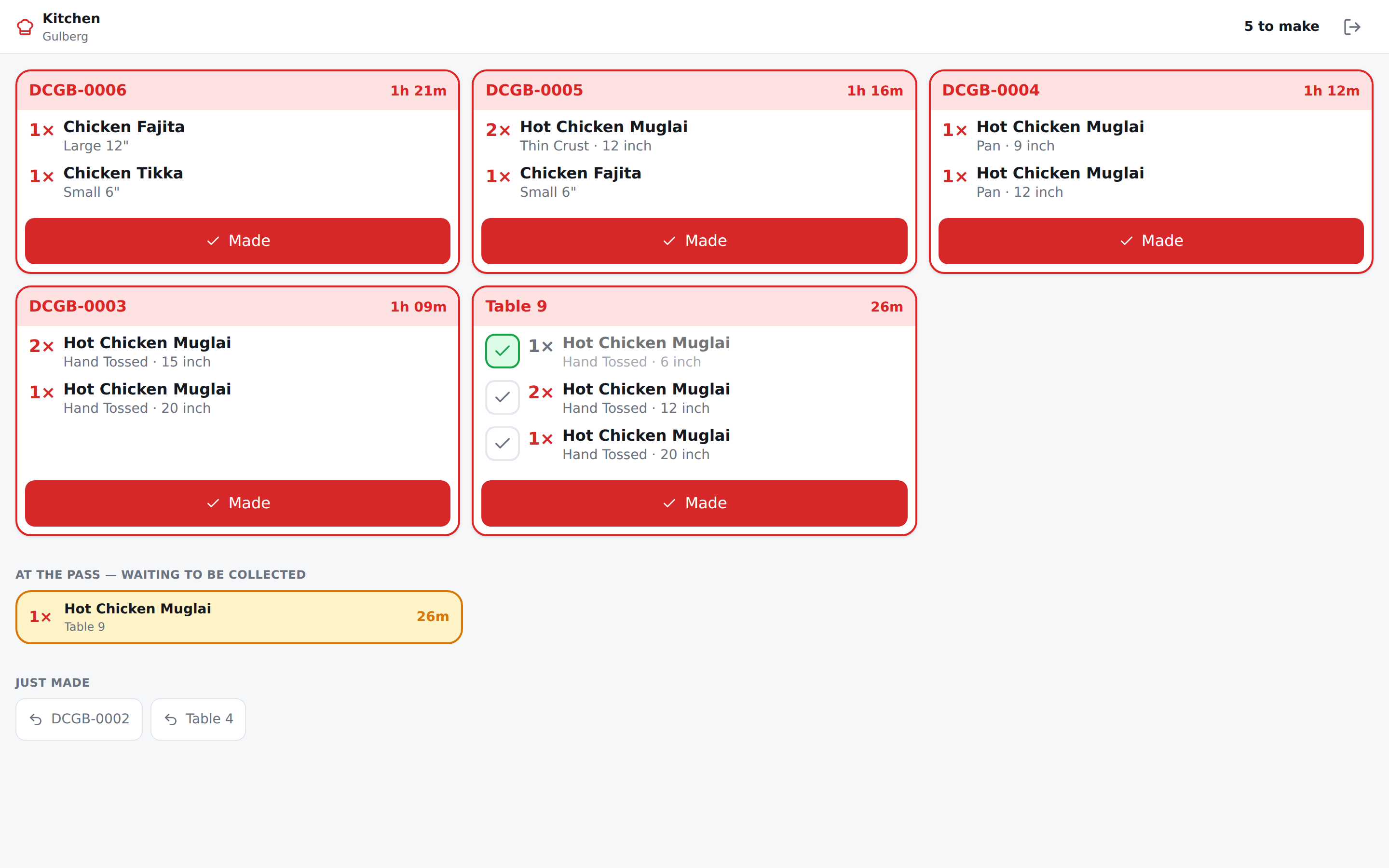
Paper is not the only way to tell a kitchen. Kitchen, in the sidebar, is the pass on a screen: every card the kitchen still has to make, oldest first, with what is on it and how long it has been waiting.
It is the same cards as the paper, read off the same record — so the screen and the roll can never say two different things. A shop that prints gets both with nothing configured.
Who opens it
Give the person a Kitchen login: Admin → Users → Add, pick Kitchen / KDS and the branch they cook at. They sign in on any browser — a tablet on the wall, the back-office PC — and land straight on the board.
A kitchen screen is not a till. There is no pairing code, nobody has to approve the device, and it does not count against the number of tills your plan includes.
An owner and a branch manager can open the board too. A cashier cannot — the till already tells them what they rang, and a counter reading the kitchen's queue is a counter promising a customer a time nobody in the kitchen agreed to.
Working the board
- Made takes the card off. It moves into Just made at the bottom, and if a thumb landed on the wrong one, tap it there to put it straight back.
- Two cooks tapping the same card is fine — the first tap is the one that counts, and the second cook simply sees the card go.
- Colours are time, not importance. A card turns amber after
kitchen.warn_minutes(10 by default) and red afterkitchen.late_minutes(20). Both are per branch, because a pizza oven and a sandwich counter do not agree about what slow is. - A cancellation is on the board too, and reads as a STOP rather than a job. Somebody has to see it and take the dish off — the same reason it comes out of the printer.
- The screen refreshes itself every few seconds. Nothing to press.
A dish at a time, on a dine-in table
A soup is ready before a biryani. On a dine-in card every dish carries its own tick, so the cook marks the soup the moment it is up and it goes out while it is hot — nobody waits for the rest of the table.
- Ticking the last dish closes the card, so there is no second button to remember. The card moving is what tells you the whole table is up.
- Made still bumps the whole card and marks every dish on it. It is the same act, not a rival one: a kitchen that plates a table together presses one button as it always did.
- Only dine-in. A takeaway and a delivery are handed over as one bag, so there is nobody to carry a single dish to and no per-dish tick on those cards.
- Undo puts the card back, and takes its dishes back off the pass with it.
The pass — what is up and waiting
A dish that has been ticked stands at the pass until somebody carries it out, and the board keeps a section for exactly that: AT THE PASS — WAITING TO BE COLLECTED. A plate going cold is now something the kitchen can SEE rather than something it finds out about from a customer.
A plate turns amber once it has been standing longer than kitchen.pass_warn_minutes
(5 by default, per branch).
And the floor is told
The moment a dish is ticked, a green Ready to collect strip appears on the device that should come for it:
- The waiter's screen shows the whole floor. A table punched at the counter belongs to nobody's phone, and narrowed to "my tables" its plate would stand at the pass with every waiter's screen empty.
- The till shows the tables it punched.
- On the Sellify app, the same strip, plus a notification and a buzz — so it reaches a phone in an apron pocket. It has its own notification channel ("Dishes ready"), separate from the new-order alarm, so you can turn one down without silencing the other.
Tapping the plate is the pickup. There is no second button: the tap that takes the notice off your screen is what tells the kitchen it was carried out, which is the only way the pass knows what is still standing there. Anybody may take any plate — a plate must not wait because one phone is in somebody's pocket.
In a browser, turn the chime on once per device: a browser will not play a sound until somebody has tapped the page, so the strip offers the button rather than staying silent about being silent.
One evening at a time
The board holds one business day — your own 7am-to-7am, not the calendar's. A card nobody bumped at midnight is not still sitting there at noon; it is yesterday's problem and it is in yesterday's reports. For the same reason a card from yesterday cannot be put back on tonight's board.
A kitchen with no printer at all
Turn on Settings → Kitchen → This kitchen reads a screen (KDS) for that branch, and turn Print a kitchen ticket for every order off. The board works with no kitchen printer configured anywhere and no paper coming out of anything.
The two are independent, so switching the screen on does not start printing, and switching the paper off does not empty the board.
If nothing is ever going to reach the board, the page says so — and it names the switch that is off, rather than sending you through a page of settings looking for it.
Stations
If your kitchen works in stations, set kitchen.ticket_mode to by department. Each
station then gets its own card and its own Made, and a row of station chips appears
across the top of the board to narrow to one of them.
On combined — the default — the whole order is one card, exactly as it is one slip on the roll, and there are no chips because there is nothing to narrow to.
Departments — where a dish is made
A department is where a dish is made: the grill, the bar, the cold station. Written once for the whole company and reused by every branch.
A department is not a menu category. "Pizzas" and "Burgers" are what a customer reads; Grill is where both are made. Keep the two lists apart, or one kitchen gets two tickets for one section.
Where a dish's department comes from: the product, else its category, else none. An unfiled dish is not a hole — it still prints, under Kitchen, on the branch's default kitchen printer. A dish reaching the pass uncooked because somebody forgot to file it is not a trade-off worth making.
Which printer
A department is a company list; a printer is a box on a wall. So the mapping is per branch: one Grill, three branches, three grill printers. Setup → Printers, on the branch.
Only a kitchen printer standing in that branch is offered. A commissary is refused outright — it has no till, so no order is ever rung there.
A kitchen printer set up on the Sellify app
On the Android and Windows app, a Kitchen ticket printer added under the app's own Printers screen is all it takes: every order that till places, every round it adds to a held table and every order it accepts prints there by itself — with the internet on or off. Nothing has to be added under Setup → Printers for it. That branch list is what the web POS prints on.
- A slip is laid out for the paper of the till's default kitchen printer. A till with an 80mm grill roll and a 58mm bar roll gets every slip at the default one's width.
- Where the branch does have kitchen printers mapped to departments, the till still prints on its own rolls, picking the one set up from that branch printer where there is one, and its default kitchen printer otherwise.
- The Print a kitchen ticket switch above still turns it off.
One slip or several
Settings → kitchen.ticket_mode, per branch:
| Mode | What comes out |
|---|---|
| Combined (default) | One slip for the whole order, in sections, in the departments' own order |
| Per department | One slip per department, each to its own roll |
A department with no printer of its own falls back to the branch's kitchen printer rather than going nowhere.
What is on the ticket
No money, ever. A kitchen ticket with prices on it is a receipt somebody will hand a customer by mistake. It says KITCHEN PRINT across the top before it says whose paper it is, so a slip lying at the pass beside a receipt is told apart at a glance.
What is on it is every detail of the dish: the quantity, the variant ("Pan · 12 inch"), every modifier under the group it was chosen from, every deal component with its own variant and modifiers, and the line's note.
Adding to a table that is already cooking
Recall a held order, add a drink, place it again — and only the drink is sent, headed ADDED TO ORDER so nobody starts the pizza again. Sellify works out the difference from what that kitchen has already been told, line by line.
Reprinting
Kitchen print on the order is the try-again button — a printer is a thing in a room, and it jams. A ticket is kept as the paper it was, so a reprint an hour later is the same slip, not a fresh reading of an order that has moved on.
A branch with no kitchen printer and no screen sends nothing and records nothing — so the day one is configured, the cooks get what they never saw. With the screen on, the card is recorded whether or not there is a roll to send it to.
Dine-in: place first, pay later
order.dine_in_holds_first (per branch, on by default) makes the till's big button
Place order rather than Pay for a dine-in table. The order is held, the kitchen is
told, the table is taken, and the bill is settled later by recalling it. A recalled order
shows Pay again — they are settling, not ordering.
Switch it off for a food court that takes the money first.
Printing never rolls a sale back
A printer that is off, jammed or unplugged is reported on the screen and logged. The sale stands. Fix the printer and press Kitchen print.