
Setting up
Taxes
Menu: Taxes · Who: owner, branch manager
How tax works here
Two things make Pakistani POS tax different from the usual, and both are built in:
- The payment method picks the rate. Cash and card are taxed differently by most authorities, so every tax has two rates. Every digital payment is taxed at the card rate — a card, a wallet (Easypaisa, JazzCash) and a bank transfer alike. Cash, and a sale put on a khata, are taxed at the cash rate. A split payment blends the two in proportion to how much was paid each way, and the tax collected is reported split by method for your filing.
- A branch can file with a different authority. A company tax set applies everywhere; a branch that defines its own taxes replaces the company set entirely — it never merges. That is how a Lahore branch (PRA) and a Karachi branch (SRB) live in one company.
The page
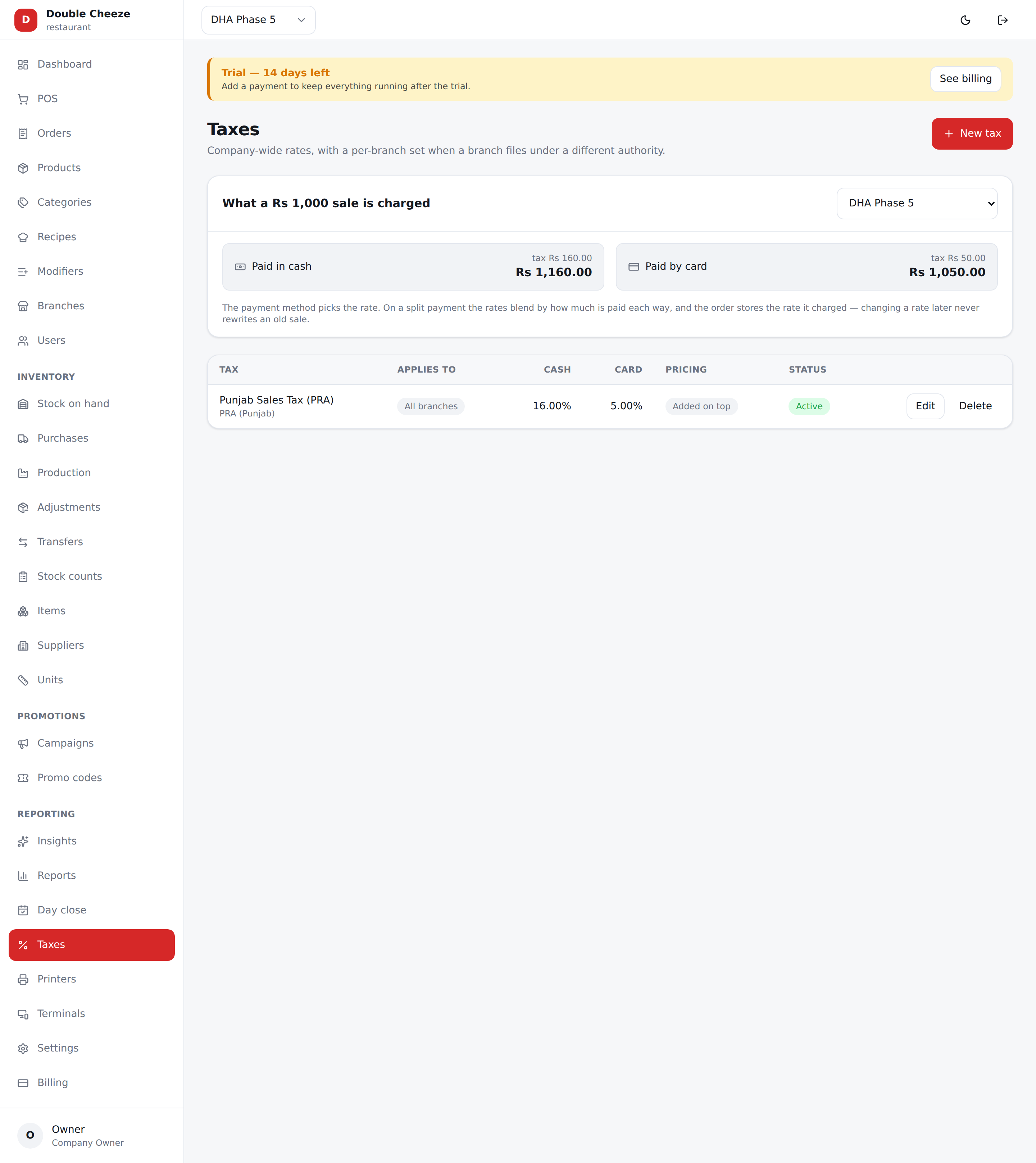
At the top, Preview branch and two boxes — Paid in cash and Paid by card — showing what a sample amount becomes under the taxes that apply to the branch you picked. Change the branch and watch the numbers change; that is the fastest way to check your setup.
Adding a tax
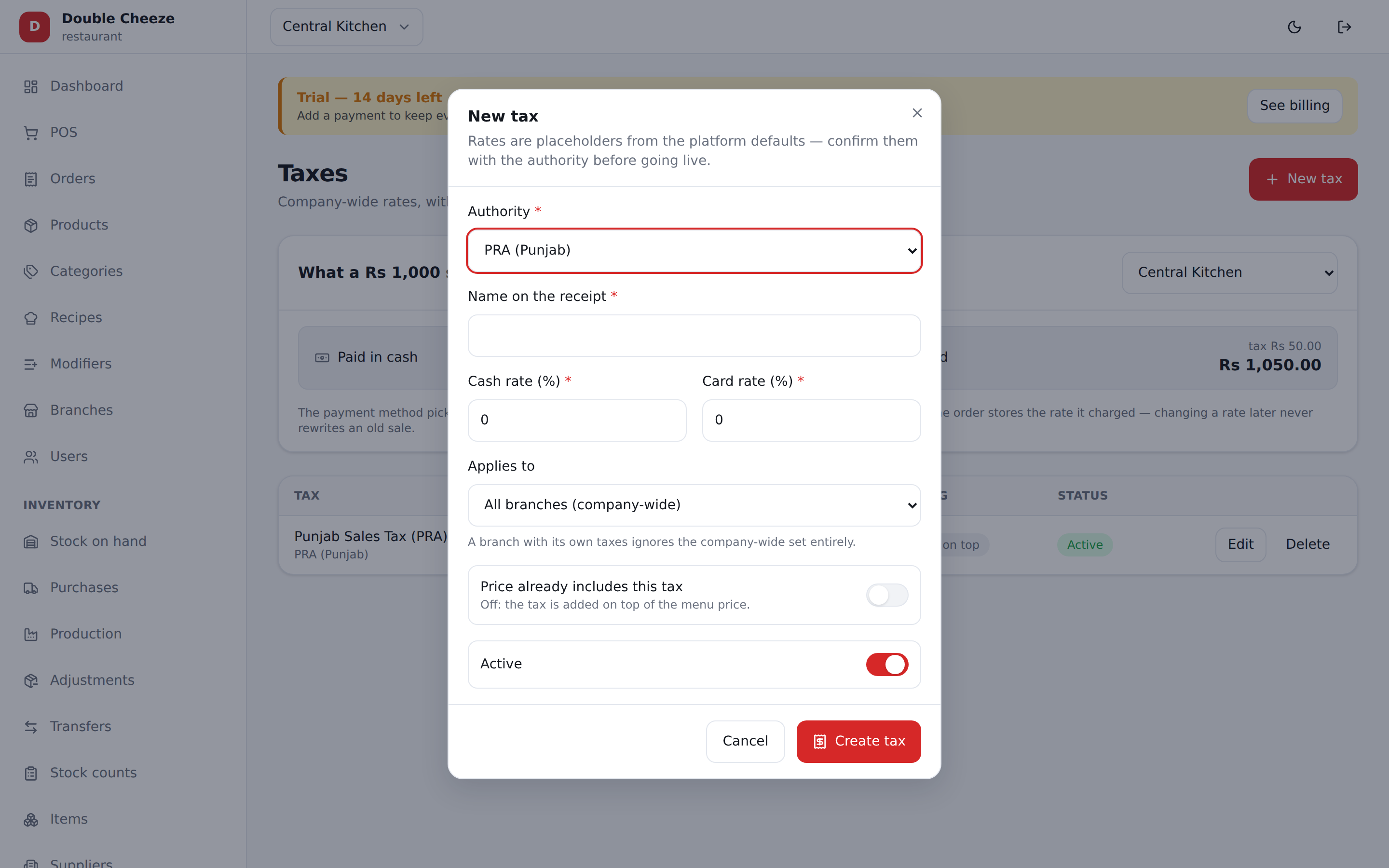
| Field | Notes |
|---|---|
| Authority | FBR, SRB, PRA, KPRA, BRA, custom, or none. Picking one fills in the name and the placeholder rates |
| Name on the receipt | What the customer sees: "Punjab Sales Tax (PRA)" |
| Cash rate (%) | Applied when the customer pays cash |
| Card rate (%) | Applied when they pay by card, wallet or bank transfer |
| Applies to | Everything, or only certain categories, or only certain products |
| Price already includes this tax | See below |
| Active | Turn a tax off without deleting it |
Inclusive or exclusive
- Exclusive (the box unticked) — the menu says Rs 1,000, tax is added, the customer pays Rs 1,160.
- Inclusive (ticked) — the menu says Rs 1,000 and that is what the customer pays; the tax is worked backwards out of it. Most Pakistani restaurants price this way.
Both can sit on the same line; the maths is the same one the receipt and the tax report use.
The seeded rates are placeholders. FBR 15/5, SRB 15/8, PRA 16/5 were entered so a new company can ring a taxed sale on day one. Confirm them with your authority before your first real customer and edit them here.
Filing with the authority
Setting a rate and filing an invoice are two different jobs. The rates above are what you charge; filing is Sellify sending each taxed sale to FBR, PRA or SRB and printing the number they give back on the receipt. It is off until you switch it on, per branch, under Settings → Tax & Fiscalisation.
FBR, PRA and SRB are built in. KPRA and BRA are not yet: pick one and the branch sells normally, the receipt simply carries no fiscal number.
How it behaves, and why:
- A sale is never held up by the authority. The order is saved, the money is counted and the stock moves first; the invoice is sent afterwards. If FBR is having an afternoon, or your connection drops, the sale still happens — only the number on the paper is missing.
- The missing ones are picked up by themselves. Every couple of hours Sellify goes back over completed, taxed sales from the last week that never got a number and files them. You do nothing; the number appears on the order and on any reprint.
- A sale with no tax on it is never filed. There is nothing to report, and the authority refuses one anyway.
- Nothing is filed twice. Once an order has a number it is never sent again.
- The figures filed are the figures on the bill, to the paisa, read off what that sale actually charged — a discount allocated across the lines included. Changing a rate tomorrow cannot rewrite what was filed today.
- A bill paid two ways is filed under whichever method most of it was paid in; the authorities' own field takes one value.
- SRB files one rate per invoice. A bill charged at two different rates cannot go through that field, so Sellify does not guess: it leaves the invoice unfiled and it has to be reported by hand. FBR and PRA take a rate per line and have no such limit.
Where the number ends up: the receipt prints it when Receipt → Print the fiscal invoice QR is on, and the Orders panel shows a Fiscal # column.
Check it before you trade. Switch on Use the authority's sandbox, ring one sale, and confirm the number comes back.
php artisan sellify:preflighton the server warns about any branch that is set to file but is missing credentials — that branch would print receipts with no fiscal number and nothing on screen would say why.
What the system guarantees
- Old sales never change. Every order stores its own tax snapshot per line, so editing a rate today does not rewrite last month's filing.
- The tax report groups by rate, not just by authority, because a filing is made per rate — 16% cash and 5% card appear as two lines.