
Hardware and the kitchen
Printers
Menu: Printers · Who: owner, branch manager
Printers belong to a branch. One shop can have three: the counter receipt printer, a kitchen printer, and an A4 printer for invoices.
Where each type actually prints
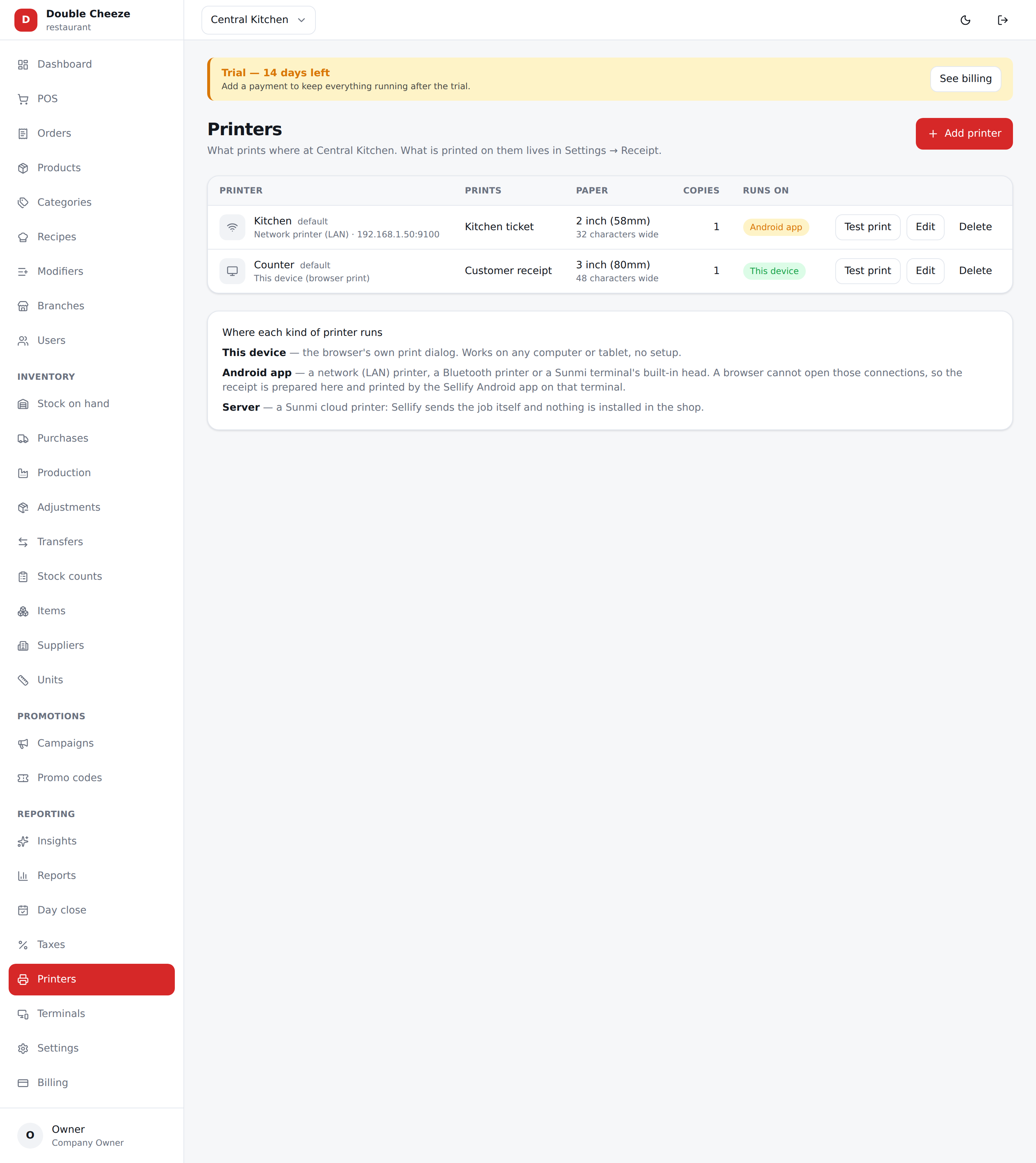
A browser cannot open a network socket, a Bluetooth port or a Windows print queue. That is why the transport matters:
| How it is reached | Runs on | Available |
|---|---|---|
| This device (browser print) | The web POS itself — the browser's print dialog | now |
| Sunmi cloud printer | Our server sends the job to Sunmi's cloud; nothing is installed in your shop | now, once Sunmi credentials are added |
| Network printer (LAN) | The Sellify app on that terminal — Android or Windows | with the app |
| Bluetooth printer | The Sellify Android app | with the Android app |
| Sunmi built-in printer | The Sellify Android app on a Sunmi terminal | with the Android app |
| USB / Windows printer | The Sellify Windows app, through Windows' own printing | with the Windows app |
Install a USB receipt printer on the PC first, with the maker's own 64-bit driver if there is one — otherwise Windows' "Generic / Text Only" driver takes a thermal receipt perfectly well. Then pick it by name in the app: the till lists exactly what Windows lists, with the PC's default printer first.
A paused or unplugged printer does not refuse the job — Windows holds it. So a receipt
can be "sent" with no paper coming out. The Printers screen says Paused in Windows — jobs are waiting when that is what happened; the sale is safe either way, and Print on the
order reprints it whenever the printer is back.
Every row on the list says which of these it is, in the "Runs on" column, and the form says it again as you pick. If you set up a printer the web POS cannot drive, it will not pretend: it hands you the receipt and says which app the job is waiting for.
Adding a printer
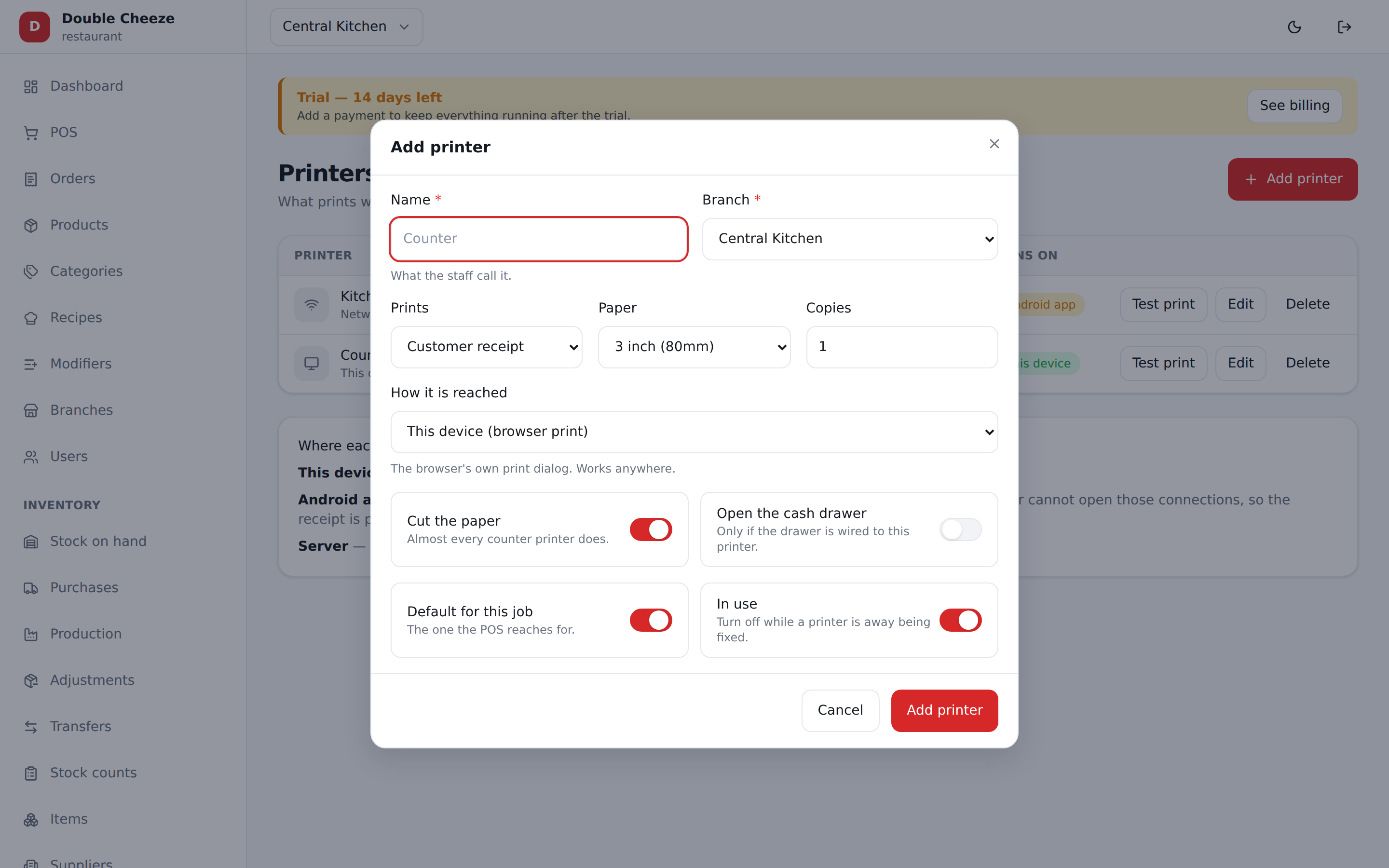
| Field | Notes |
|---|---|
| Name | What the cashier will see on the Print button: "Counter", "Kitchen" |
| Branch | Which shop it sits in |
| Prints | Customer receipt, Kitchen ticket, or A4 invoice |
| Paper | 3 inch (80mm), 2 inch (58mm), or A4 |
| How it is reached | The transport from the table above |
| IP address / Port | Network printers. Port is 9100 unless yours differs |
| MAC address | Bluetooth printers |
| Serial number | Sunmi printers — the SN printed on the device |
| (nothing) | USB / Windows printers. Which Windows printer it is gets picked on that PC, in the Windows app — the same as pairing a Bluetooth printer, which belongs to the tablet and not to the shop's record |
| Cloud key | Sunmi cloud only. Stored encrypted and never shown again |
| Copies | 1 for most shops, 2 where a copy is filed |
| Cut the paper | Thermal only |
| Open the cash drawer | Thermal only — kicks the drawer when the receipt prints |
| Default for this job | The one this branch reaches for. One default per job |
| In use | Untick to park a printer without deleting it |
Test print
Every row has Test print. It prints a real receipt marked *** TEST PRINT ***, so
nobody files it as a sale. Do this before the shop opens, not during a rush — it is the
fastest way to know a setting is right.
Paper sizes
| Characters across | What it is | |
|---|---|---|
| 3 inch (80mm) | 48 | The normal counter receipt |
| 2 inch (58mm) | 32 | The same receipt, tighter |
| A4 | — | A different document: letterhead, item table with tax per line, totals, signature lines |
Use A4 for a customer who needs a proper invoice; use 80mm or 58mm at the counter.
Rules the system enforces
- A network printer needs an IP, a Bluetooth one a MAC, a Sunmi one a serial number — a printer nobody could reach is refused when you save it. A USB / Windows printer asks for none of them, because the PC is where it is chosen.
- A thermal printer cannot be set to A4, and an A4 printer cannot be a kitchen ticket.
- The cloud key never comes back to the browser once saved.
The app prints on the printer set up on that machine
A printer set up in the Windows or Android app is that machine's own — which USB queue, which Bluetooth pairing — and the receipt for a sale rung there goes to it, on the paper it is set to. The branch's default row on this page decides where the web POS prints and pre-fills the app's form; it never overrides what the till in front of you is plugged into.
So a counter with its own USB roll prints on it even when the branch default is the web POS, and a till set to 58mm gets a 58mm receipt on a shop whose default row says 80mm.
Text or picture
Settings → Receipt & Printing → How the receipt is printed.
| What it is | When | |
|---|---|---|
| Text (default) | The printer's own characters, in columns. Instant, and it works with the internet down | Every shop, unless it asks otherwise |
| Image | The whole receipt is drawn as a picture and sent as dots — real type, a proper table, a heading that looks like one | A shop that wants the paper to look like the invoice on screen |
A picture is a second or two slower to print, because it is a much bigger job to send.
The Android and Windows tills draw their own when the internet is down, so a shop that has asked for a picture gets one all day — the same receipt whether the router is up or not. It is drawn in the same typeface, from the same figures, with the same settings on it; a customer cannot tell the two apart, and neither can you without holding them side by side under a light.
The web POS is not a till you can sell from with no internet, so it always gets the server's.
Nothing about the drawing is ever allowed to stop a receipt coming out. A
server without the php-gd image extension, a till that ran out of memory
halfway, a paper size that is not a roll — every one of them prints the text
receipt instead, quietly, rather than printing nothing.
Both are the same receipt with the same figures on it. The setting is per branch, so one shop can print pictures while another prints text.
What the receipt says
Where it prints is this page. What it prints — logo, address, NTN, tax breakdown, footer — is Settings → Receipt & Printing.