
Setting up
Users
Menu: Users · Who: owner (all branches), branch manager (the branches they run)
Adding someone
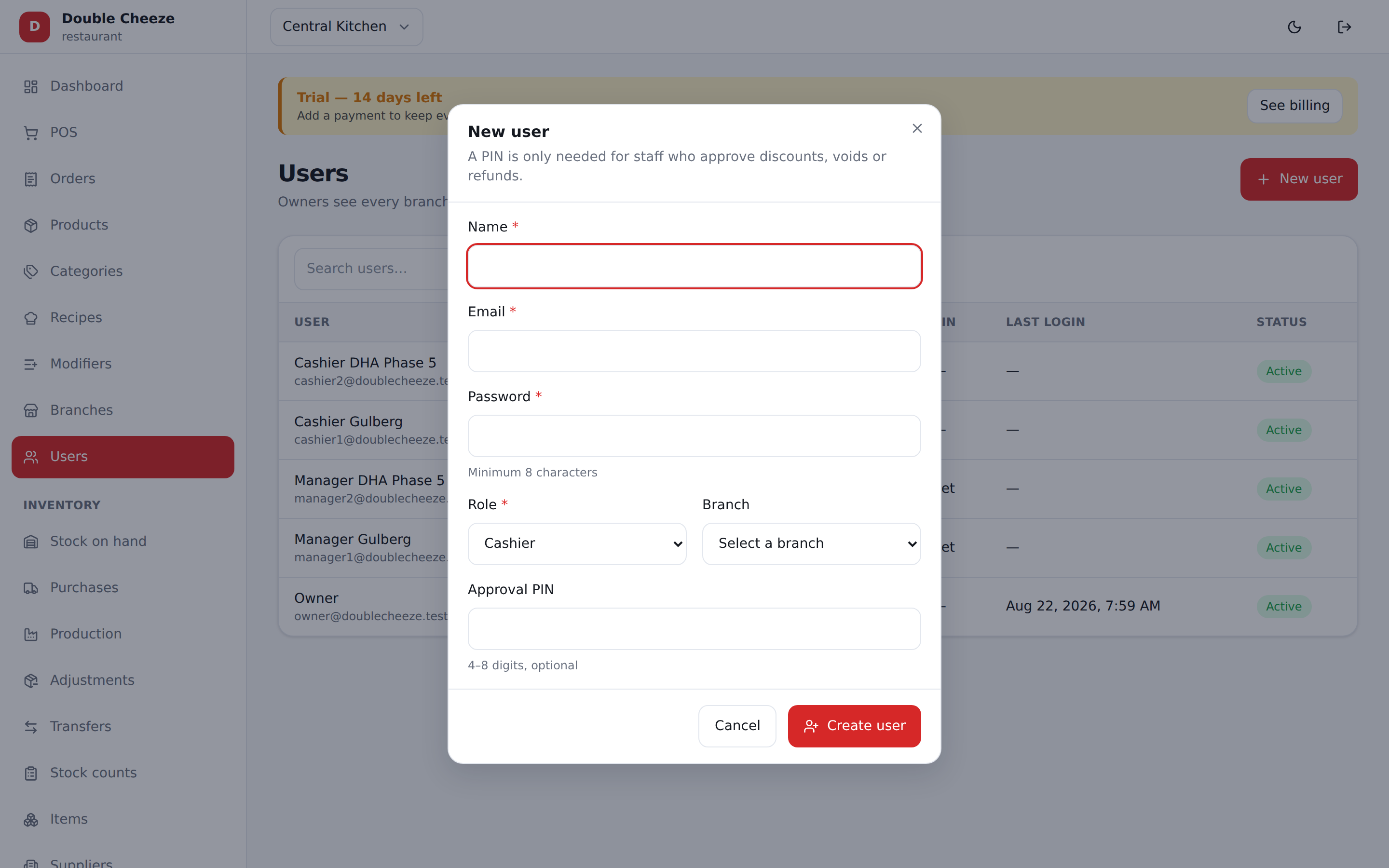
| Field | Notes |
|---|---|
| Name | As it should appear on the receipt ("Attendant") and in reports |
| How they sign in. Unique across the whole platform — if someone works for two companies they need two addresses | |
| Password | At least 8 characters. They cannot change it themselves yet; a manager resets it here |
| Role | See below |
| Branch | Owners are company-wide and have no branch. Everyone else is fixed to one |
| PIN | 4–8 digits, optional. Two uses: it unlocks a till without typing an email and password, and for a manager it approves discounts, FOC, voids and a day reopen |
| Photo | Optional. Shown beside their name on this screen only — it is not on the receipt and it is not on the tills |
Changing someone
Edit on their row opens the same form. Two boxes behave differently there: Password and PIN are blank, and leaving them blank keeps the ones they have — type into a box only to change it.
Give the counter staff a PIN
It is worth setting one for every cashier, not just for managers. A till is closed and opened far more often than anybody signs off, and a PIN turns that into four taps instead of an email and a password.
The till offers it only to the person who signed in there last, and only once they have signed in with their password at least once on that machine — so the very first sign-in on a new till is always the full one. Four wrong PINs and the till goes back to asking for the email and password; nobody is locked out.
Taking somebody's PIN away stops the till offering them one the next time they sign in.
Can sign in is the one to turn off when somebody leaves. Their sales, their approvals and their shifts stay exactly where they are; they simply cannot get in. Deleting a person is not how you retire them.
The Role list shows only what you are allowed to hand out: an owner can create anyone in the company, a branch manager can create cashiers and kitchen staff, and a call centre HOD can create operators and managers but not another HOD. Call centre roles appear only if your plan includes the call centre.
Roles, in plain words
In one shop
- Company owner — sees every branch, changes settings, reads every report, handles billing. Give this to the person who owns the business, not to a manager.
- Branch manager — runs a shop: sells, receives stock, reads that branch's reports, closes the day, dispatches riders, and approves what a cashier cannot do alone. One man may run several — see One manager over several shops.
- Cashier — the till and nothing else.
- Kitchen — kitchen tickets.
Across the whole company (these have no branch, like an owner)
- Call centre operator — takes orders down the phone into any outlet. Takes no money.
- Call centre manager — the above, plus the board across every outlet.
- Call centre HOD — the above, plus standing discounts and editing complaints. Cannot mint another HOD.
- HR — the employee book and the Staff reports. No settings, no billing, no catalog, no stock, no day close, no till.
See Call centre, Employees and staff meals and Who can do what.
One manager over several shops
A chain with four outlets and one man who runs all four used to have two bad answers: make him an owner — which hands him the other eleven branches, the plan and the tax table — or give him four logins. Neither is what the shop means.
So a branch manager has a home branch (the Branch picker) and, underneath it, Also manages — a tick box for every other outlet. Tick the three he runs and he holds four.
- Only the owner sees the list, and only for a branch manager. Putting somebody over a second outlet is worth money, so it is not a manager's own act to hand out. A cashier stands at one till and a waiter works one floor; neither is ever offered it.
- The home branch is not a tick box. It is the picker above, and it is already his.
- He picks one at a time, off the branch dropdown in the top bar, exactly as an owner does. Every report, the dashboard, the day close, the Z report and the shelf are about one outlet — there is no total across his own four shops.
- Everything else is unchanged. He is not an owner: no company settings, no billing, no plan, no tax table. What he gains is reach, not authority.
- Making him an owner, or demoting him to a cashier, clears the list rather than leaving it stale. Giving him a branch again later starts from nothing — whoever gave him four shops last year is not who is deciding now.
Leaving Also manages untouched on a save changes nothing; clearing every box takes the extra outlets away and leaves him with his home branch.
Two things that are grants, not roles
"The cashier who is allowed to haggle" and "the accountant who sees the payroll" are not job titles, so they are tick boxes on the user rather than roles. Only the owner gives them.
| Tick box | What it allows | Who has it by position |
|---|---|---|
| Can override price | Type a price at the till instead of the shelf price — Price at the counter | Owner, branch manager |
| Can view salary | Read salaries in the employee book | Owner, HR |
A salary somebody may not see is absent from the screen, never blank — so nobody reads "you may not see this" as "nobody set one".
The PIN
The PIN is how a manager approves something at the till without signing the cashier out: a discount over the cashier's limit, a free-of-charge order, a void, reopening a closed day. Which of those need a PIN is set in Settings → Approvals & Security.
The PIN is checked on the server and is never stored in the browser. A manager types it on the till, the till gets a one-time token that is spent on that one action, and it expires after 15 minutes.
Rules the system enforces
- A branch manager can only create users in a branch they run themselves, and cannot make an owner. Naming any other outlet does not fail — the new person simply lands in the manager's own branch.
- Only the owner may put somebody over more than one branch. A manager cannot hand out an outlet they do not run.
- Your plan limits how many users a company may have; past it, creating one is refused with the limit named.
- Deleting a user hides them; past sales still show who rang them up.
For the full picture — every screen against every role, and what a manager may not touch — see Who can do what.