
Selling
Taking an order at the table
Menu: Sell → Waiter · Who: waiter (the owner or branch manager creates them on Setup → Users)
A waiter walks the floor with a phone. They punch what the table asked for, it lands on every till in that shop, and the counter settles the bill when the customer is ready.
Nothing about that is a second Sellify. It is an ordinary dine-in order placed by somebody who is not standing at a till — the same shape a call-centre order already has.
Restaurants only. A shop with no tables is never offered the role.
Setting it up
- Admin → Users → Add. Pick Waiter, and pick the branch they work.
- Hand them a phone. Either will do:
- A browser. Open the Sellify address, sign in, and they land straight on the waiter screen. Nothing to install.
- The Sellify app. On the setup screen tap This is a waiter's phone — under the till's own button — then sign in.
- That is the whole setup.
The two are the same screen against the same server, so a floor can run half and half. An owner or branch manager can open it as well, from Waiter in the sidebar.
A waiter's phone is not a till, and never pairs with one. There is no pairing code to type, nobody has to approve the device, and it does not count against the number of tills your plan includes. Six waiters do not eat six terminals.
What the screen does
The table first, then the menu — a waiter knows the table before they know the dish.
Type the table number, tap through the menu the same way a cashier does (the same crust and size questions, the same options), then Send to the counter.
The order appears on every till in the branch straight away: the banner, the alarm, and an Accept button. When somebody at the counter accepts it, the kitchen ticket prints.
Another round
The table asks for two more drinks fifteen minutes later.
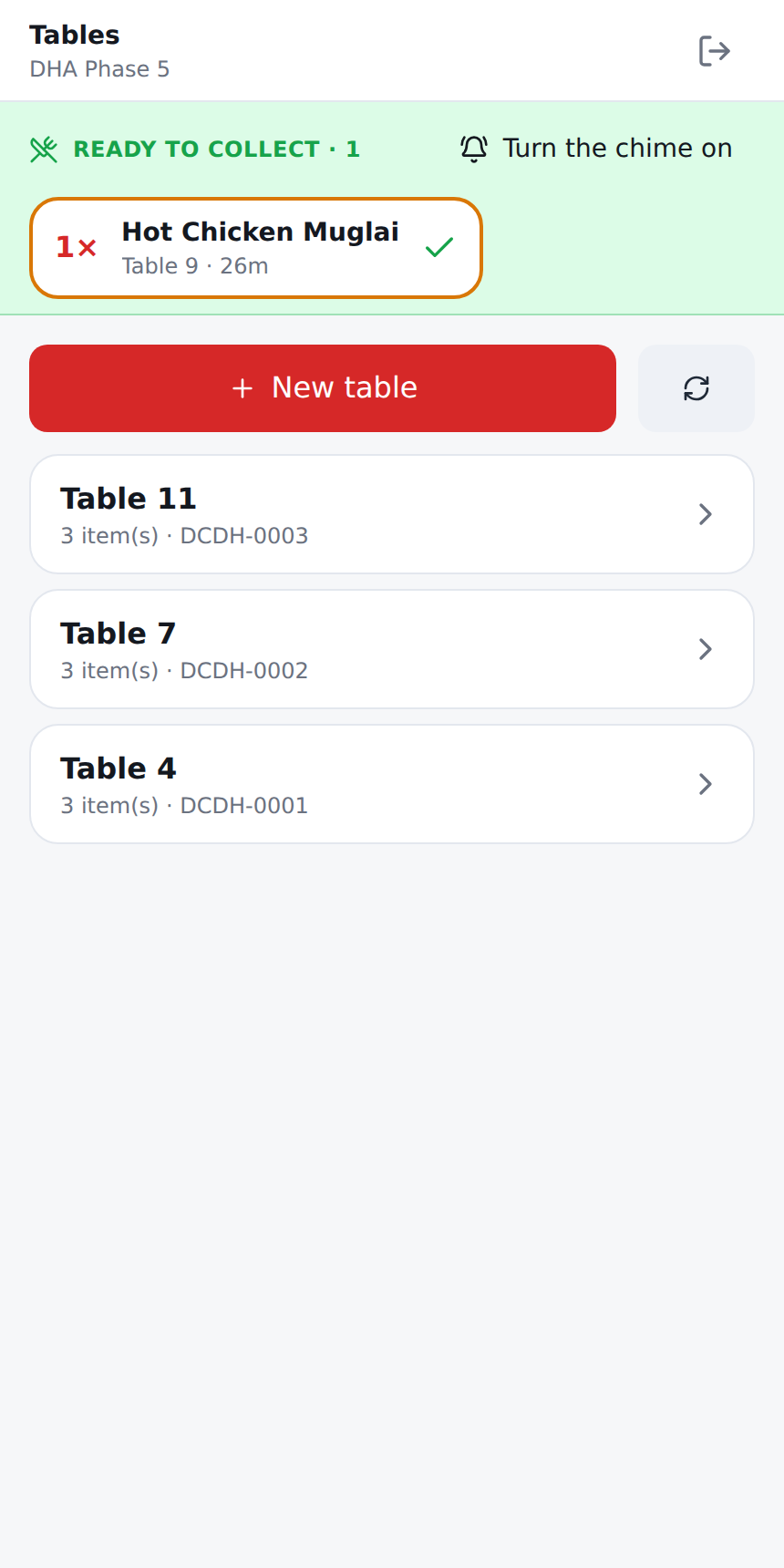
Open tables, at the top of the screen. Every table the counter is holding is listed — the table number, its order number and how many things are on it. Tap one and the whole bill comes back onto your screen with the table already filled in. Add the two drinks and press Send.
The kitchen is only told what has changed. A drink added prints as ADDED TO ORDER; a dish taken off prints a cancellation, so nobody starts cooking something that is no longer wanted, and nothing is made twice. That is also why the bill has to be brought back first — sending from an empty cart would take the dinner off the order.
- Any waiter can pick up any table. Whoever is nearest deals with it; the bill is the floor's, not one phone's.
- Only tables are listed. A takeaway or a delivery is the counter's, and would be refused anyway.
- A dish that has been taken off the menu since cannot be brought back, and the screen says so rather than quietly serving a shorter dinner. Tell the counter before adding anything else to that table.
Accepting is not withdrawn by a round. The shop agreed to make the food; two more drinks does not change that.
When a dish is ready
A green Ready to collect strip appears across the top of the screen the moment a cook ticks a dish as made. On the Sellify app it is a notification and a buzz as well, so it reaches a phone in an apron pocket.
Each plate says what it is and which table it goes to, and how long it has been standing
there — amber once it has waited longer than the shop's own limit
(kitchen.pass_warn_minutes, 5 minutes by default).
Tapping the plate is the pickup. There is no second button: the tap that clears it from your screen is what tells the kitchen it was carried out, which is the only way the pass knows what is still standing there going cold. So tap it when you take it, not before.
- Every waiter sees the whole floor, not only their own tables. A table punched at the counter belongs to nobody's phone, and if it were narrowed the plate would stand at the pass with every screen empty.
- Anybody may take any plate. Whoever is nearest carries it; a plate must not wait because one phone is in somebody's pocket.
- Dine-in only. A takeaway is handed over as one bag at the counter.
In a browser, tap Turn the chime on once — a browser will not play a sound until somebody has tapped the page.
What a waiter cannot do, and why
None of these is missing from the screen and quietly allowed over the wire — the server refuses each one:
| Why | |
|---|---|
| Take money | The bill is settled at the counter, on a till, in a drawer somebody is answerable for |
| Hold a bill on the phone | It would be invisible to every till in the building |
| Give a discount, apply an offer or a promo code | A decision made at the till, on the record |
| Write a bill off | A manager's decision, at the till |
| Type a price | Agreed at the counter, by somebody who is standing at one |
| Void or reject anything | Only a manager, at the till |
| Accept their own order | Accepting means somebody in the kitchen has read it |
One live bill per table still holds. Two waiters cannot both punch Table 4 — the second is told the table is taken and picks another. It works across the two devices as well: a table a waiter took is taken at the counter too.
Prices
By default a waiter's device shows no prices at all. Not hidden on the screen — the server sends none, so there is nothing on the phone to read.
What that costs, plainly: a customer asks what something comes to and the waiter cannot answer from the device. They read the menu, or they ask at the counter.
If that is not how you want to run your floor, turn it on: Admin → Settings → Waiter → Show prices on the waiter's device, per branch.
It needs a connection
A waiter's order has to reach the counter to be cooked and paid for, so there is no offline mode. With no network the screen says so and the Send button is off. This is deliberate: a table sitting on one waiter's phone, invisible to the whole shop, is exactly what this feature exists to prevent.
At the end of the night
A table nobody accepted will stop the day closing. That is right — the shop has cooked food nobody has paid for — and the refusal names the order. Accept it and settle it, or void it at the till.